Agent & MCP — integrate with LedgerFlow at AI speed
Point your coding agent at LedgerFlow and build your integration in an afternoon.
Integration is usually where ledger projects lose their first month: reading specifications, guessing at semantics, discovering the documentation was written two releases ago.
LedgerFlow publishes a secure connector built on the open Model Context Protocol, which customers attach to from the connector features of tools they already use — VS Code, Claude Code, Claude Desktop, Cursor — with a single credential. The agent then explores this deployment live and writes correct integration code against the real API, instead of you hand-translating a document.
It exposes a curated, read-only set of capabilities plus documentation search, so the agent grounds its code in how the platform actually works — every call bounded by exactly the same permissions and record-level security as a normal API client.
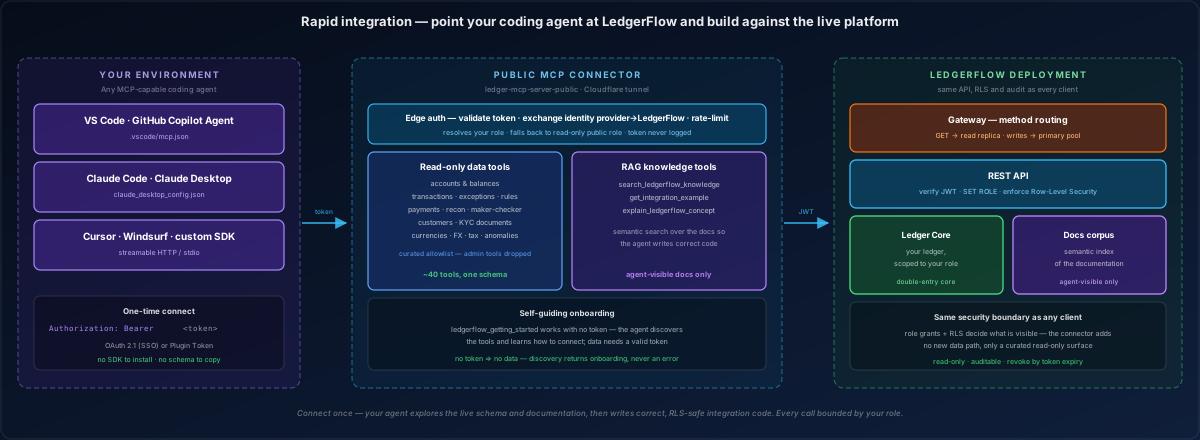
How customers integrate — your tools, our platform
The connector closes the gap between reading the documentation and shipping working code. Your agent connects from your own environment (left), talks to the curated connector (middle), which forwards every call down the same governed path every other client uses (right). No parallel implementation, no special-case surface, nothing that can drift out of step with the real system.
Why it accelerates integration:
- No SDK to install, no schema to copy. The agent reads the live capability surface and stays in sync with this deployment automatically — including changes made after you started.
- Grounded, not guessed. Documentation search means generated code matches real endpoints, parameters and rules, rather than a plausible invention.
- Safe to explore. Read-only, permission-bounded and fully audited — you can hand a partner or contractor a scoped credential and let their agent learn your platform without exposing anything they should not see, and without a supervised environment.
What an agent can do once connected
Two kinds of capability, one credential:
Data (read-only) — accounts and balances, transactions including exceptions, notes and reversal chains, transaction rules, fraud and anomaly signals, approval batches, reconciliation, payments, customers and verification documents, and reference data such as currencies, exchange rates and tax rates. Every result is scoped by the credential's permissions and record-level visibility.
Knowledge — documentation search, worked integration examples and concept explanations, so the agent grounds its answers and its code in how the platform genuinely behaves. Only material explicitly marked as externally visible is ever returned; internal operational documentation is never exposed to an external agent.
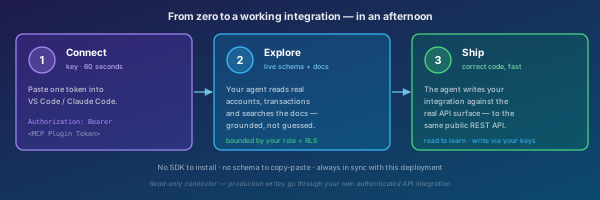
Three steps to a working integration
1 · Connect — generate a credential and paste it into your tool's configuration. About a minute.
2 · Explore — your agent reads real accounts, transactions and reconciliation data and searches the documentation — grounded in this deployment, bounded by your permissions.
3 · Ship — the agent writes your integration against the genuine API surface. Reads happen through the connector so it can learn; production writes go through your own authenticated credentials, which is a boundary the connector cannot cross.
The result: integrations that would take days of specification-reading land in an afternoon, and stay correct because the agent read the live platform rather than a stale document.
Read-only and permission-bounded
A connecting user resolves to their own identity — or, where there is no local account, to a dedicated read-only identity with minimal rights. It can only ever read, and only what record-level security permits.
Administrative and internal capabilities — user administration, system and identity configuration, the security audit log, scheduler and queue internals — are not exposed at all. They are absent from the surface, not merely restricted, so there is nothing for a determined agent to discover.
The credential never grants write access under any circumstances.
Nothing bypassed, nothing special-cased
The connector holds no state of its own. It forwards your credential into the very same API the rest of the platform uses, so permissions, record-level security and audit logic apply identically — an agent's request is indistinguishable, in enforcement terms, from a request you made yourself.
This is why the feature is safe to offer at all. It adds a new way in, never a new level of access: there is no privileged service identity behind it that a flaw could expose.
Credentials are signed for this deployment alone and cannot be replayed against another.