Customer KYC & Document Verification
Automated onboarding compliance across every customer and entity type.
LedgerFlow covers the full spectrum of regulatory verification — KYC for individuals, KYB for legal entities, KYM for merchants, KYT for transaction monitoring, and CDD for enhanced due diligence. Country-specific requirement sets, three verification tiers, and a hands-off invitation-to-approval workflow make compliance operations manageable at scale.
Onboarding friction is where customer acquisition quietly leaks. Every day a verification sits waiting on a manual email chase is a day of lost activation — and every compliance officer spending their time collecting documents is one not spending it on the cases that need judgement.
Verification is built into the platform. No third-party workflow engine to licence, integrate and keep in sync.
Five Verification Types, One Unified Engine
Five distinct regulatory programmes, each configured independently with its own document requirements and jurisdictional policies:
- KYC — Know Your Customer: identity and address verification for individuals
- KYB — Know Your Business: corporate registration, ownership structure and ultimate beneficial owners for legal entities
- KYM — Know Your Merchant: trading licence, banking details and risk profile
- KYT — Know Your Transaction: behavioural and transactional due diligence, wired directly into the fraud engine
- CDD — Customer Due Diligence: enhanced verification for higher-risk relationships
Each maps to verification tiers — Basic, Standard, Enhanced — with country-level overrides, so compliance teams tailor requirements per jurisdiction without changing code. Entering a new market is a configuration exercise your compliance team performs themselves, not a development project competing for engineering time.
One engine drives both the staff dashboard and the customer portal, so there is a single source of truth for every entity's verification status — and no possibility of the two disagreeing during an audit.
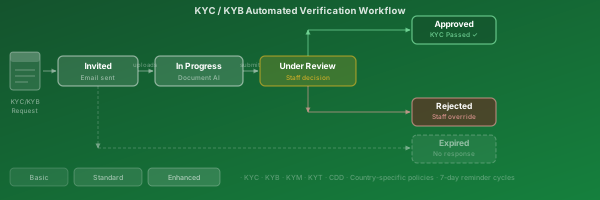
Verification Lifecycle — Invited to Approved
The diagram shows the full lifecycle of a verification process. The platform initiates each one, sends the invitation, and records every state change with a complete audit trail.
Automated reminder cycles — if a customer has not uploaded within the configured window (seven days by default), a reminder goes out automatically. Up to three rounds are attempted before the process expires. Staff can send a manual reminder at any point.
The chasing is the part worth automating. It is repetitive, it is easy to let slip, and every skipped reminder is a customer who never completes onboarding.
At review, three outcomes: the compliance officer approves (status updated on the customer record), rejects (reason recorded, customer notified), or requests more documents (the process returns to in-progress). Status changes are recorded independently of the reviewing transaction, so a decision cannot be lost to a technical failure elsewhere.
Individual KYC — Natural Persons
Standard KYC collects and validates evidence of identity and residential address for individuals — customers, beneficial owners and authorised signatories.
Typical requirements (configurable per country):
| Tier | Documents |
|---|---|
| Basic | Government-issued photo ID |
| Standard | Photo ID + proof of address (< 3 months) |
| Enhanced | Standard + source of funds + additional checks |
Documents are uploaded through the customer portal and read automatically — text, document type and expiry date are extracted without an officer transcribing anything. Each document is fingerprinted on arrival so any later alteration is detectable.
Expiry is tracked and acted on: the platform re-initiates verification before documents lapse, rather than discovering during an audit that a portion of your book is unverified.

Entity KYB — Legal Entities & Merchants
KYB and KYM verify the corporate identity of legal entities and merchants — PSPs, sub-merchants, vendors and corporate customers.
KYB typically requires:
- Certificate of Incorporation or company registration
- Memorandum and Articles of Association
- Register of Directors and Shareholders
- Ultimate Beneficial Owner declarations
- Recent bank statements or audited accounts
KYM adds:
- Trading licence
- Payment method agreements
- Acquiring bank details
- Risk category classification
Entity verification status and tier are tracked against the customer record and surfaced in the management interface with full document history — so the question "when was this merchant last verified, and by whom" is always one click away.
Three Verification Tiers
Every requirement set sits in one of three tiers, each representing a higher level of scrutiny. The tier is driven by customer risk classification and jurisdictional rules.
Basic — entry-level. A single primary identity document. Suitable for low-value, low-risk relationships and prepaid products.
Standard — full identity plus address confirmation. The default for most retail customers and SME merchants; requires documents from at least two different categories.
Enhanced — comprehensive due diligence for high-risk, high-value or politically-exposed relationships. May require source-of-funds evidence, independent references, or risk committee sign-off.
Tiering exists so that risk-proportionate onboarding is the default rather than an aspiration. Your low-risk customers are not made to complete enhanced diligence, and your high-risk ones cannot slip through on a single document.
Tier definitions and their per-country overrides are configuration, maintained by compliance staff.
Automated Invitation & Reminder Workflow
The verification workflow runs daily and manages the whole lifecycle without manual intervention:
- Detect — finds customers and entities needing verification: new registrations, tier upgrades, documents approaching expiry
- Invite — sends a personalised message with a secure upload link
- Remind — chases automatically after the grace period if nothing has been received
- Escalate — up to three reminder rounds, each logged
- Expire — after three rounds, marks the process expired and notifies the compliance team
- Renew — proactively re-verifies approved customers before their documents lapse
Step 6 is the one that quietly prevents an audit finding. Renewal is where most manual compliance programmes fail, because nothing prompts anyone until a regulator asks.
Every transition is recorded with full status history, and the process is safe to re-run at any frequency without duplicating work or double-chasing a customer.
Automated Document Processing
When a customer uploads a document, the platform reads it for you — extracting text, detecting language, classifying the document type and pulling out the expiry date where one is present.
The pipeline:
- Customer uploads through the self-service portal
- The document is stored and fingerprinted on arrival
- It is queued for automated reading
- Extracted text, language, classification and expiry are captured
- Metadata is stored alongside the document
- The reviewing officer sees the original and the extracted data side by side
That last step is the productivity gain. The officer's job becomes confirming a decision rather than transcribing a passport — the difference between a queue that keeps up and one that grows.
Integrity guarantees: the fingerprint is taken at upload and re-verified before processing, so any change to a document between upload and review is detected and flagged. This gives a cryptographically verifiable chain of custody from the moment a customer submits a document through to compliance approval — which is precisely what an auditor asking "how do you know this is the document they sent" needs to see.
Document processing runs inside your deployment. Customer identity documents are never sent to an external service for reading.